Connecting your Better Business Bureau (BBB) profile to HiFiveStar is a strategic way to consolidate your business reputation. Adding your BBB link puts BBB on your HiFiveStar review page, so customers can go there to leave a review. HiFiveStar does not import BBB reviews yet.
This integration ensures that your high standards for transparency and trust are prominently displayed alongside your other major review platforms.
This video shows our previous app. The written steps on this page describe the current one.
More BBB Reviews: Your review page offers customers a button to review you on BBB.
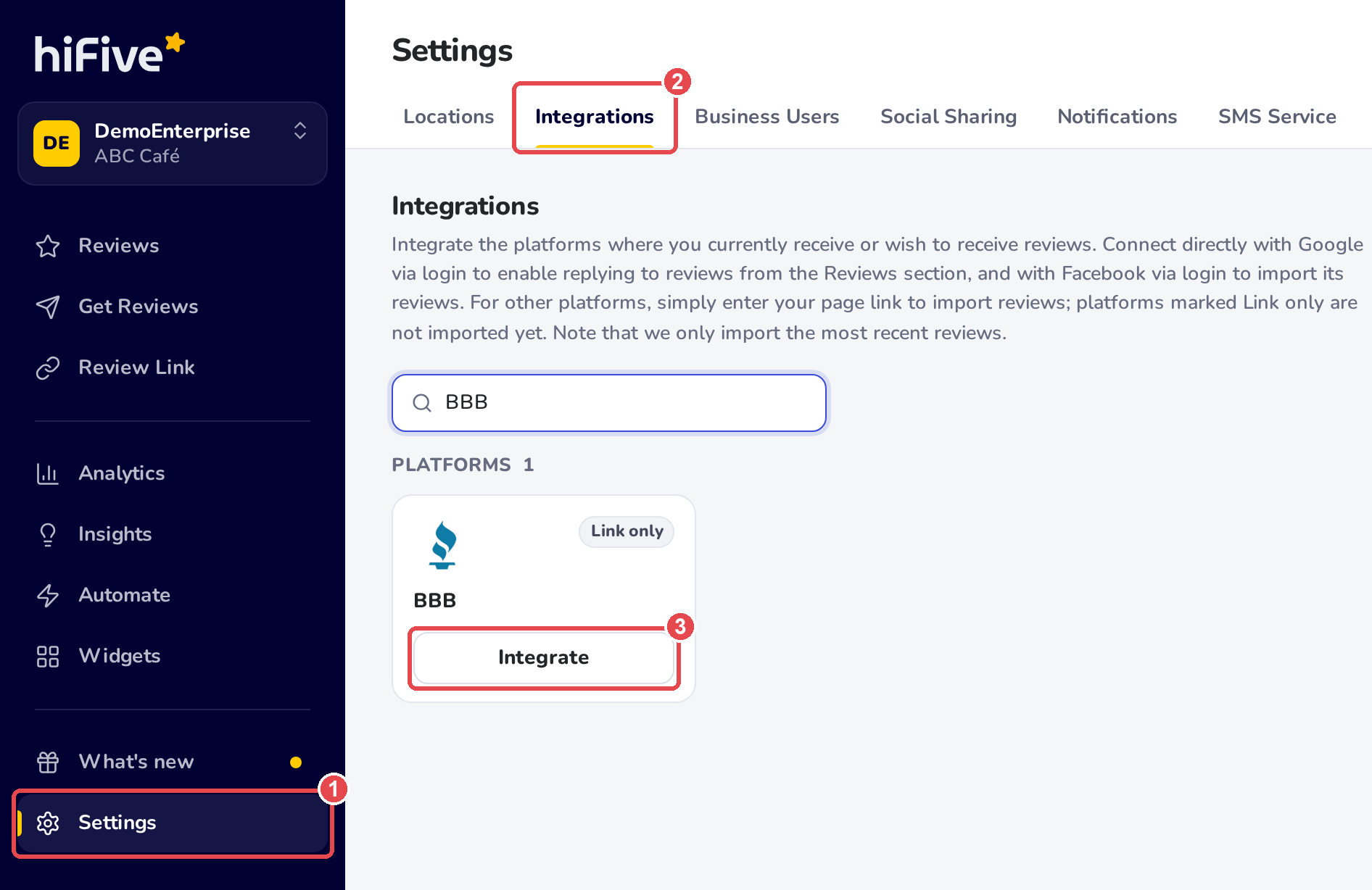
Access your HiFiveStar account by entering your credentials on the login page.
Once your main dashboard loads, locate and click on 'Settings' in the navigation menu.
Inside the Settings menu, select the 'Integrations' tab. This section displays all supported platforms.
Scroll through the list or use the search bar and type BBB.
Click the 'Integrate' button and you will be prompted to provide your specific BBB profile URL.

Paste your link into the field and click 'Integrate BBB'. HiFiveStar saves the link and adds BBB to your review page.
Respond Promptly BBB users value responsiveness. Aim to acknowledge feedback within 24–48 hours to show you are attentive to customer concerns.
Stay Professional BBB reviews are often used as formal evidence of business conduct. Always keep your tone calm, factual, and helpful, regardless of the review's sentiment.
Take it Offline For complex complaints or sensitive issues, provide a direct phone number or email in your response. This allows you to resolve the matter privately and professionally.
Integrations Explained
Maximizing Your Online Presence with HiFiveStar's Platform Integrations
HiFiveStar API for Advanced Customization
Send customers to HiFiveStar from your own software
