By understanding the data behind your online reputation, you can move from guessing what your customers want to knowing exactly how to improve your business.
This guide explores how to interpret your metrics and apply them to real-world growth strategies across different industries.
To make data-driven decisions, you must first understand what each section of your dashboard represents.
The Reviews Growth chart shows your total review count over the period you pick at the top of the page (for example, the last 30 days). In this period, your total reached approximately 246,500 reviews.
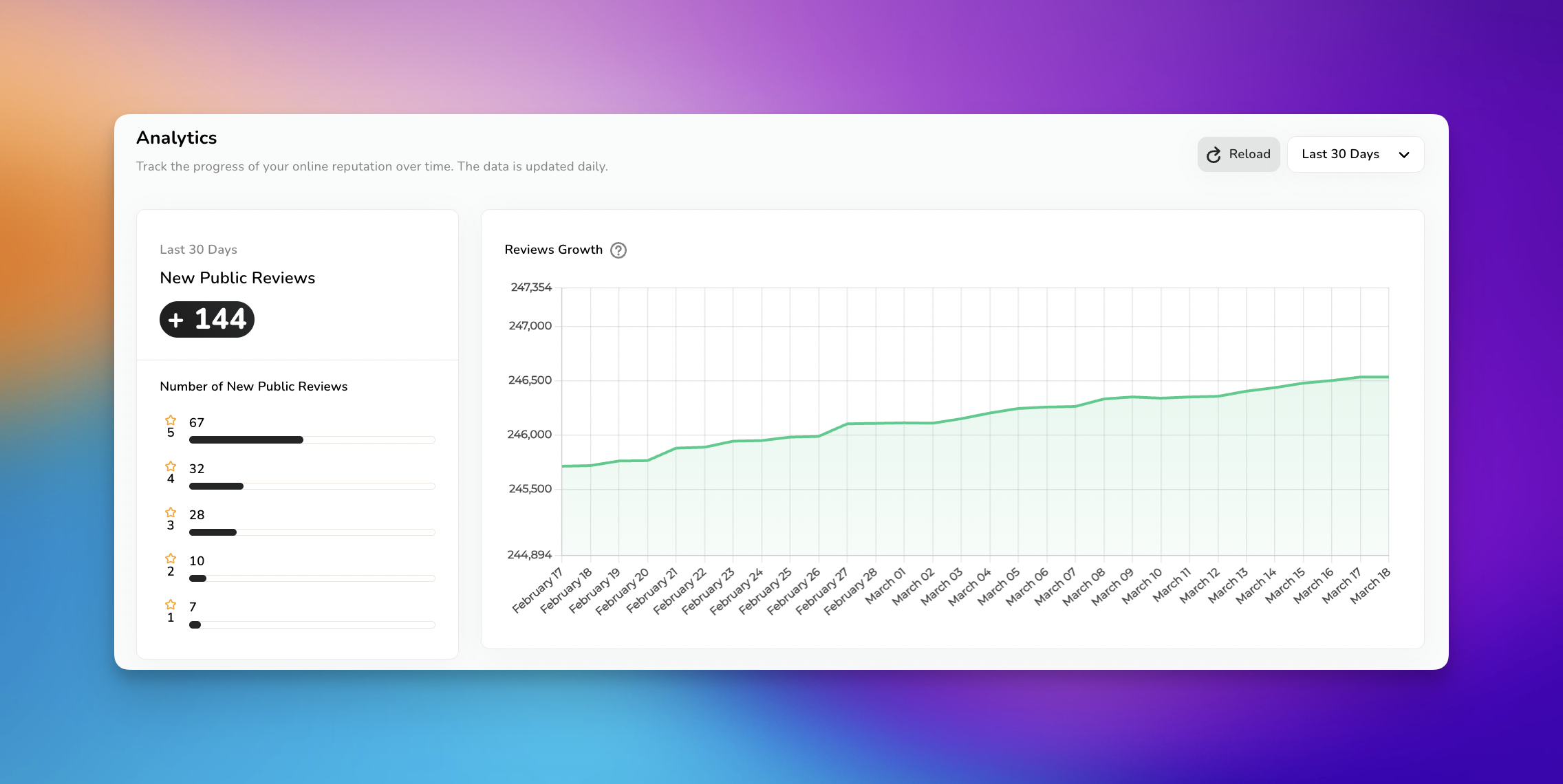
The Insight: A steady upward slope indicates healthy "Review Velocity." This is a key ranking factor for local SEO.
The Action: If your growth line begins to plateau, your business is "aging" in search results. Increase the frequency of your invitations to remain relevant.

The Review Funnel tracks how many people interact with your brand before posting a review.
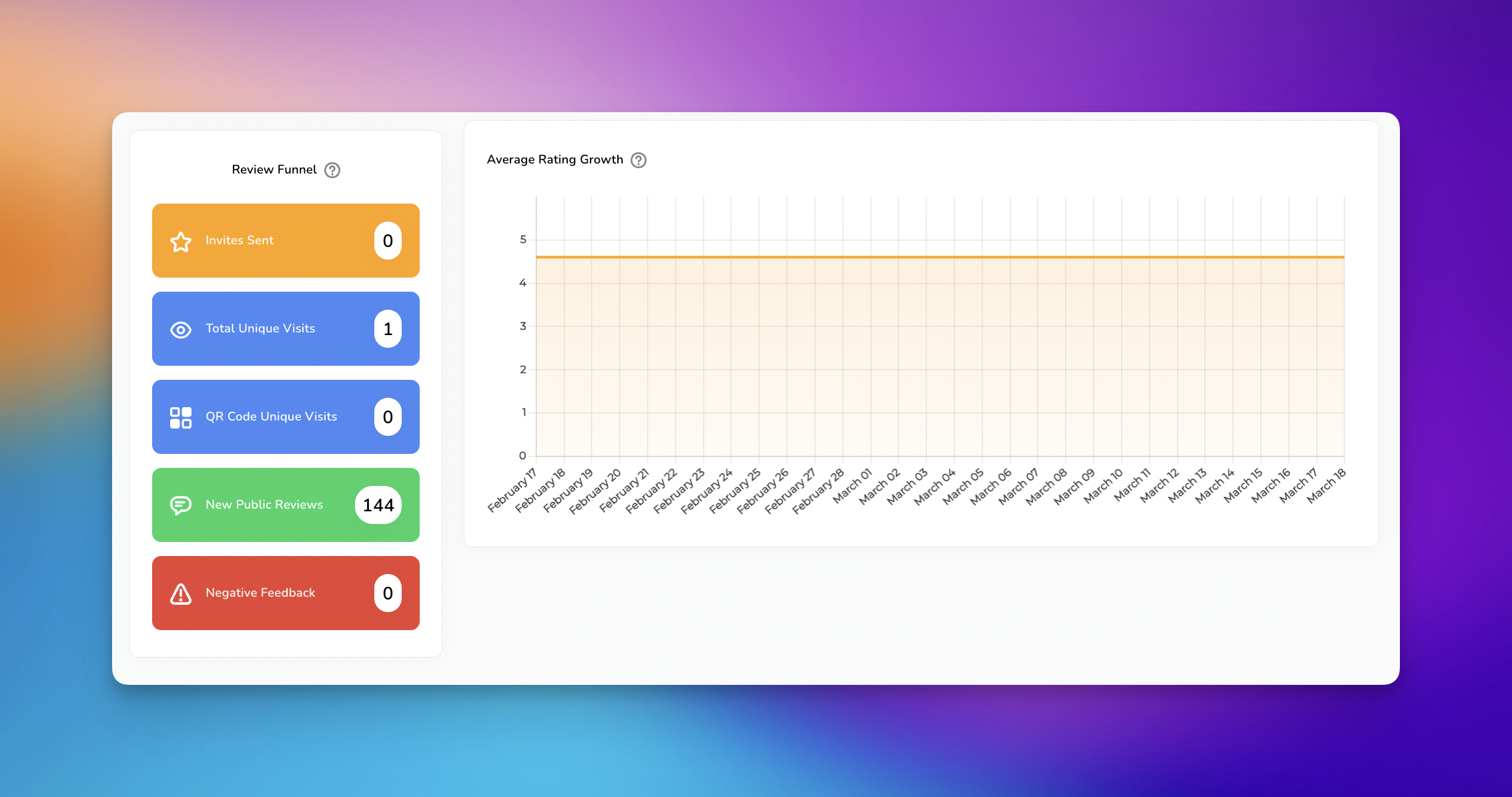
Total Visits vs. New Public Reviews: The data shows 1 visit but 144 new public reviews. This indicates that the vast majority of your reviews are being generated organically or on external platforms rather than through direct HiFiveStar invitation links.
The Action: If your "Invites Sent" is 0 but you have high "New Public Reviews," you are missing an opportunity to control the customer journey. By sending invites, you can guide customers toward specific platforms where you need more visibility.

The Number of New Public Reviews breakdown (5-star down to 1-star) acts as your quality control report.
The Insight: Out of 144 new reviews, 67 are 5-star. However, the 7 1-star reviews provide the most actionable data.
The Action: Analyze the specific feedback in those 7 reviews. Are they mentioning the same staff member, a specific product, or a wait time? This is your roadmap for internal training.

Every business niche can leverage this data differently to find a competitive advantage.
The Data: Monitor Negative Feedback (private responses).
The Strategy: Patients often prefer to share sensitive concerns privately. If you see a rise in private negative feedback, it may indicate a front-desk communication issue. Addressing this privately allows you to resolve the matter before it becomes a public 1-star review, protecting your professional reputation.
The Data: Look at Average Rating Growth.
The Strategy: High-ticket clients look for consistency. A flat "Average Rating" line at 4.5 or higher is better than a fluctuating one. If your average starts to dip, use Get Reviews to send targeted invites to your most successful, long-term clients to stabilize your score.
The Data: Track Reviews Growth against specific dates.
The Strategy: Compare your review spikes to your kitchen or floor schedule. If you notice 5-star reviews specifically on Friday nights, identify which manager or chef was on duty. Use this data to reward top-performing staff and replicate their service style across other shifts.
The Data: Analyze Total Visits.
The Strategy: If you have high visits to your review landing page but low completion rates, your "Ask" might be too long. Use this data to simplify your review request message or offer a different platform option (e.g., switching from a long form to a quick star-rating).
Step | Data Point | Business Objective |
| Review Funnel | Identify where customers drop off in the feedback process. |
| Rating Distribution | Pinpoint specific service flaws to fix. |
| Review Growth | Ensure your business stays ahead of local competitors in search results. |
| Negative Feedback | Catch issues early to maintain a high public average rating. |
Data is the foundation of a modern reputation strategy. By regularly reviewing your HiFiveStar Analytics, you gain the clarity needed to refine your customer experience, boost your local search rankings, and ultimately grow your revenue. Remember, the goal is not just to collect reviews, but to use the stories within those reviews to build a better business.
If you have questions about specific metrics or need help setting up your review funnel, our support team is available to assist you.
Analytics Explained
Learn how to use HiFiveStar's Analytics page to track customer reviews and improve your online reputation
